

Teskay
Starlink Gen 3 Router Mount | All-in-One Metal Wall Mount Kit
Starlink Gen 3 Router Mount | All-in-One Metal Wall Mount Kit
Couldn't load pickup availability
All-in-One Metal Wall Mount for Starlink Gen 3 Router & Power Supply
Organize your Starlink Gen 3 network hardware in one clean wall-mounted location. This one-piece metal bracket securely holds the Gen 3 router and V3 power adapter together while keeping cables accessible and freeing up valuable desk, shelf or floor space.

Router + Power Supply in One Mount
The dedicated 2-in-1 structure organizes both the Starlink Gen 3 router and V3 power adapter within one compact wall footprint.
2mm Iron-Alloy Construction
A rigid approximately 2 mm thick metal structure provides a stable mounting platform, finished with a corrosion-resistant surface coating.
Slide-In, Cable-Friendly Design
Open sides allow the Starlink components to slide into position while leaving their connection points accessible for cleaner cable routing.
A Cleaner Way to Organize Starlink Gen 3 Hardware
Move both major Gen 3 indoor hardware components off furniture and keep the installation concentrated on a wall.
The router and power adapter share one integrated metal frame for a more compact and coordinated installation.
The open structure avoids enclosing the equipment and leaves space around the connection areas for normal cable access.
Unlike a closed enclosure, the bracket leaves the router and power adapter exposed to surrounding airflow.
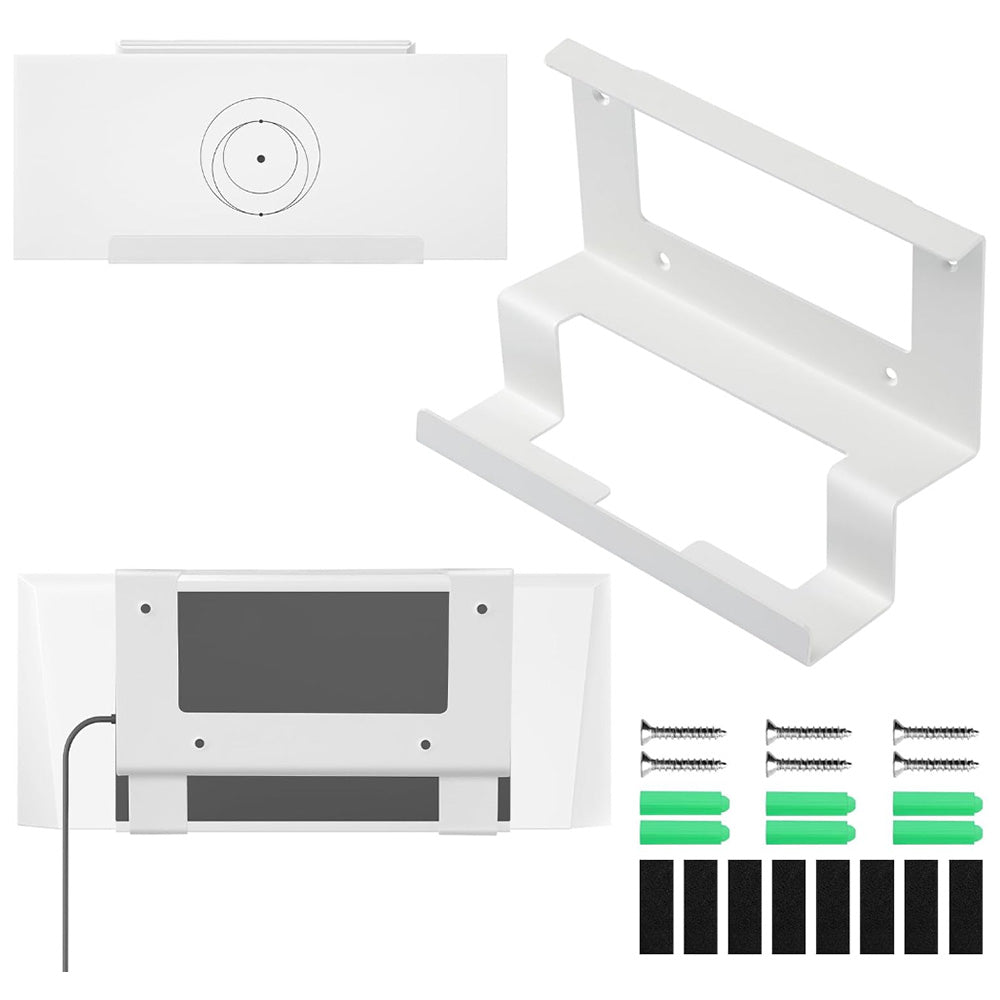
Eight supplied pads can be positioned at contact points to help reduce direct metal-to-device contact and unwanted movement.
Mount Only — Starlink Hardware Not Included
The package contains the metal wall mount and installation hardware. The Starlink Gen 3 router, power supply / V3 Power Ethernet Adapter, Starlink dish and network cables are not included.
One-Piece Metal Construction

The bracket is formed from a rigid ferrous metal / iron-alloy sheet rather than lightweight molded ABS.
The coated metal surface is designed to resist normal oxidation and everyday wear.
Choose a black or white finish to better coordinate with the wall, Starlink equipment or surrounding room.
Components load from the side, making installation and later removal easier after cables are disconnected.

Approx. 5.12 in / 13 cm high, 3.15 in / 8 cm front-to-back depth, 6.7 in / 17 cm front support span, with approximately 0.07 in / 2 mm metal thickness.
Screw-In Wall Installation
Select a stable mounting surface with enough clearance for the router, power adapter and cable bends.
Hold the bracket flat and level against the wall, then mark the mounting-hole locations before drilling.
Drill accurately at the marked locations using a bit appropriate for the wall material.
Insert suitable expansion anchors and secure the metal bracket firmly with the supplied screws or wall-appropriate hardware.
Apply the supplied pads at appropriate equipment contact points before placing the Starlink components into the frame.
Slide the Gen 3 router and power adapter into their dedicated sections from the side.

This is a screw-mounted metal wall bracket, not an adhesive mount. Always choose anchors and fasteners appropriate for the actual wall material and installation load.
The coated metal bracket is designed to resist normal corrosion, but router and power-supply placement should still follow the environmental and ventilation requirements specified for the Starlink electronics themselves.
Specifications
| Attribute | Details |
|---|---|
| Product | All-in-One Metal Router & Power Supply Wall Mount |
| Compatibility | Starlink Gen 3 Router + V3 Power Ethernet Adapter / Power Supply |
| Starlink Dish Mount | No — Indoor Router / Power Hardware Organizer |
| Mount Type | 2-in-1 One-Piece Wall Mount |
| Material | Iron Alloy / Ferrous Metal |
| Finish | Corrosion-Resistant / Anti-Rust Coating |
| Color Options | Black / White |
| Approx. Mount Height | 13 cm / 5.12 in |
| Approx. Base Depth | 8 cm / 3.15 in |
| Approx. Front Support Span | 17 cm / 6.7 in |
| Metal Thickness | Approx. 2 mm / 0.07 in |
| Component Loading | Side Slide-In Design |
| Cable Access | Open / Accessible |
| Ventilation | Open-Frame Construction |
| Wall Installation | Screw-In Mounting |
| Drilling | Required |
| Router Included | No |
| Power Supply Included | No |
| Starlink Dish Included | No |
| Published Product Weight | Not Published |
| Published IP Rating | Not Published |
| Package Contents | 1 × Metal Mount + 6 × Expansion Tubes + 6 × Expansion Screws + 8 × Anti-Slip Pads |
Quick Answers
What Starlink hardware does this mount fit? +
It is custom-shaped for the Starlink Gen 3 router and the corresponding V3 Power Ethernet Adapter / power supply.
Is the Starlink Gen 3 router included? +
No. The router shown in the product images is for installation reference only.
Is the Starlink power supply included? +
No. The package contains the metal bracket and installation hardware only.
Is this a Starlink dish wall mount? +
No. It is designed for the Gen 3 indoor router and power hardware, not for mounting the Starlink antenna / dish.
Does it fit Starlink Gen 2 or Starlink Mini? +
No. The bracket geometry is specifically designed around the Starlink Gen 3 router and its matching power hardware.
Does installation require drilling? +
Yes. The supplied installation method uses drilled wall holes, expansion anchors and screws.
What wall can I install it on? +
Use a structurally suitable wall and anchors appropriate for the actual substrate. Concrete, masonry, drywall and timber may require different drilling and anchoring methods.
Can I install it outdoors? +
The metal mount has a corrosion-resistant finish, but the Starlink router and power equipment must still be installed within the environmental limits specified for those electronics. Indoor or appropriately sheltered installation is the conservative choice.
Will the mount block the router ports? +
The bracket uses an open front/back and side-access layout intended to preserve normal cable access when the hardware is positioned correctly.
Can I remove the router again after installation? +
Yes. Disconnect the cables first, then the slide-in structure allows the router and power adapter to be removed from the side.
Does this mount improve Starlink Wi-Fi speed? +
The bracket itself does not amplify Wi-Fi or increase network speed. Router placement, building layout and wireless interference still determine real-world Wi-Fi performance.
Will the bracket trap heat around the equipment? +
It uses an open-frame design rather than a closed enclosure, allowing surrounding airflow. Always maintain the equipment manufacturer's required ventilation clearance.
What colors are available? +
The current product is available in Black and White.
What are the published dimensions? +
Current product imagery shows approximately 13 cm / 5.12 in height, 8 cm / 3.15 in base depth, 17 cm / 6.7 in front support span and approximately 2 mm / 0.07 in metal thickness.
Is this the same as the plastic ABS Starlink wall mount? +
No. This version is a one-piece iron-alloy metal bracket. Separate ABS plastic Starlink Gen 3 wall-mount products use different structures and installation hardware.
What comes in the package? +
One metal wall mount, six green expansion tubes, six expansion screws and eight black anti-slip pads.
SKU: ACC-IC-0136-0001